
















Reviews

“We’re not immune to workplace violence... this is certainly a system that helps to mitigate that.”
Chance Farmer
Chief of Police, Deaconess Health System

“We’ve had other systems that were not user friendly... this is by far the easiest system to work with and the most effective.”
Dave McLaughlin
Director of Safety Services, Ashland University

“We have a lot of locations for one county... With 911Cellular, if there were an emergency, we can get someone there very quickly.”
Corey Howard
Greenbriar County School District

“It’s probably the highest rewarding software purchase that I’ve made in my five years as CIO...”
Ray Stanley
Chief Information Officer, Marian University

Why wait? Revolutionize security at your workplace!
Your Keyboard Panic Button Questions, Answered
How do my responders view incoming alerts?
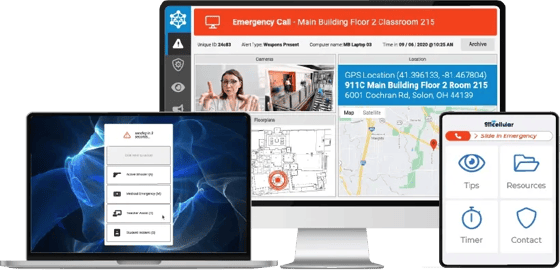
Alerts activated by end users are received via the 911Cellular Portal, which is a cloud-based application that can be installed on Windows and Mac computers. Once alerts reach the Portal, they can be forwarded to other team members via SMS, phone call, email, and other communication methods.
Can details about previous alerts be viewed?
Yes, the 911Cellular Portal contains detailed information about previous activations. This data can be viewed, sorted, and downloaded as reports.
Can this software be installed on laptops and desktops?
Yes, the Keyboard Panic Button application can determine the real-time location of the device it is installed on, such as laptop computers.
What happens if someone triggers an alert from outside our facilities?
The Keyboard Panic Button application will recognize when an alert is triggered from outside of your facilities and notify the user to dial 911 for assistance.
Can alerts be triggered from a computer’s lock screen?
Yes, lock screen activation is available for applications running on the Windows operating system.
Can the Keyboard Panic Button application receive and display info on screen?
Yes, administrators may send mass alerts to computers with the Keyboard Panic Button software installed, which will present as a large “screen takeover alert.”
What are the system requirements?
Windows: Windows 7 or more recent, must have a minimum .NET Framework of 4.7.3 Mac: MacOS Mojave or more recent
Is this a cloud-hosted application?
Yes, and as a result, no onsite servers or additional hardware is required.
Is there an API?
Yes, the 911Cellular API is accessible at no additional cost to customers.
How long does it take to get this up and running?
Less than a month. After contract execution, all customers are introduced to a dedicated Onboarding Specialist who will guide them through the implementation process.
What use cases is the Keyboard Panic Button good for?
The Keyboard Panic Button is great for de-escalating tense and potentially violent situations. This can include aggressive patients, scenarios where weapons are present, or suspicious behavior. The application can also assist during medical emergencies and critical (but not emergency) situations, such as receiving and displaying information about system downtime or business operation disruptions.
How much does this cost?
An annual license fee is determined by the number of users and the selected feature set. Once we learn more about your environment, our security experts will provide a personalized quote.